

Relax and recharge at one of our many cabin homes and condominiums conveniently located throughout Yosemite West, Wawona, Bass Lake and Fish Camp. Our properties provide easy access to Yosemite’s must-see attractions including Yosemite Valley, Badger Pass Ski Area, Glacier Point, Wawona Golf Course and Mariposa Grove, home to California’s giant redwood trees. To make your stay with us as comfortable as possible, many of our properties provide Jacuzzi hot tubs, WiFi, barbecue grills, fireplaces, cable TV and more. Check out our lodging rental listings below!
Get Reservations for Top Yosemite Lodging
147 Properties Available
-
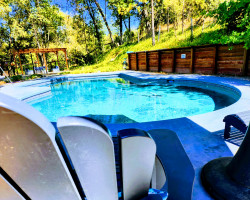
Casa De Colores
Perfect Hideaway after a Day at the Park. , Swimming Pool and Pet Friendly. Casa De Colores is a comfortable private Cottage for 4 with a King size bed and (Queen Size Sofa Sleeper Max ...
-

Kuma Lodge
Welcome to your luxury modern mountain retreat — newly built in 2026, Kuma Lodge is a spacious 3-bedroom, 2-bath home designed for comfort, relaxation, and unforgettable gatherings. Whethe...
-
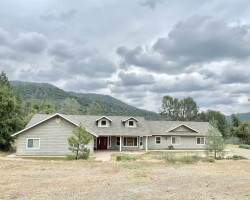
Zen YoGa
Zen Yoga is a large private home nestled in the Sierra National Forest. Hosting amazing mountain views, this home has 4 bedrooms and 3 bathrooms and can comfortably accommodate up to 10 gue...
-
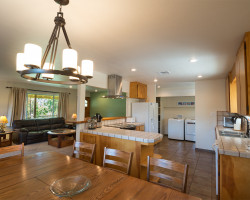
Blue Bird Ranch
Blue Bird Ranch, nestled in the pines and oaks on over an acre property, is a 3 bedrooms, 2 bath home with family game room. Relax on the porch, BBQ and watch the many different species of l...
-

Casa Serenity
Welcome to Casa Serenity. Perched up on the hillside, you will enjoy beautiful sunsets from this mountain home. There are 3 bedrooms and 2 bathrooms with each room equipped with a queen size...
-
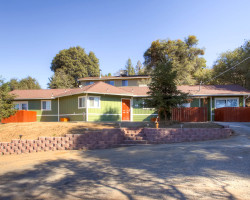
Harmony Hilltop Hideaway
Pet-Friendly $50 per night fee, A/C, Netflix! Perched up on the hillside you will enjoy beautiful sunsets from this mountain home. There are 3 bedrooms and 2 bathrooms. The master has a kin...
-

Golden Trout Retreat
Pet-friendly $50 per day fee, Hot Tub, A/C, Wifi! Golden Trout is a 4-bedroom, 3-bath log-style home that has it all. With a spacious kitchen and dining area, you'll have all the comforts o...
-

Anglers Rest
Family Fun! A/C, Disney plus, outdoor games! Anglers Rest is a family friendly cabin located up historic road 632 at 3300 ft elevation. Surround yourself with towering pines and enjoy watc...
-

Pioneer
Newly built in 2020, this luxury custom home, pet friendly and fully equipped! Pioneer is a spacious one-bedroom cabin that hosts a Cal-King bed, a deep soaking tub, and a gourmet-equipped k...
-

Cedar Mountain Lodge
Surrounded by cedar and oak trees and just 12 miles from the South-Gate entrance to Yosemite National Park, this lovely cabin on the hill, with a private wraparound deck and private patio, i...
-
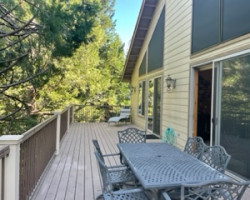
Black Pine Lodge
Beautiful home with scenic views in Fish Camp, just minutes from the South gate entrance to Yosemite National Park!
-
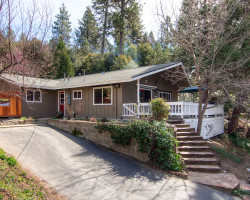
Fishermen’s Oasis
Hot Tub, WiFi, A/C, Close to Yosemite and Bass Lake! The Fishermens Oasis home is located in the pristine Yosemite Forks subdivision of Oakhurst, above 3000 ft elevation. Its only 12 miles...
-

Magic Escape
Creek view, swim/fish, A/C, Netflix! Experience the Magic of Yosemite! Magic Escape is a lovely custom 3 bedroom, 2 bathroom home located in the pristine Yosemite Forks Subdivision of Oakh...
-

Sierra Springs
Sierra Springs WITH AIR CONDITIONING!!! Located in Yosemite Forks Estates 4 bedrooms & 2.5 baths, newly remodeled 2000 square foot cabin with NEW outdoor Jacuzzi. Lewis Creek sits right in t...
-
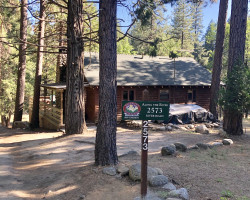
Along The River
River front property with WiFi! Along the River is a charming 2 bedroom 1 bath cabin that comfortably sleeps 6, situated on the Merced River in Wawona, inside Yosemite National Park!